Geology at this outcrop
Compare your field observations with published map units, formations, lithologies, and descriptions. U.S. coverage first; detail varies by location and source.
Geology image
A static view around the selected location: translucent geology over USGS topography, with a formation legend and the selected location at the red target.
Image sources and offline use
North is up. The image shows published unit boundaries; translucent colors and numbered labels are assigned for this image. The legend comes from the visible polygons, not the nearby sample points. Areas without a geology tint have no mapped polygon coverage. Small units may have no number on the image; their colors remain in the legend.
Macrostrat's combined map may use different source maps at different zoom levels. Source map-sheet seams may appear as boundaries; repeated names can represent separate source units. This is a field reference, not a surveyed contact map. Image width and scale bar are approximate ground distances in feet at the center latitude. Descriptions and basemap labels retain original wording and units.
Geologic data: Macrostrat and original map providers, CC BY 4.0. Software credits.
Topographic background: USGS The National Map and data contributors — USGS Topo (public domain). Roads, streams, contours and terrain detail vary with source coverage and image width.
Creating an image sends the surrounding area to Macrostrat and USGS. Saved images include both layers and are available offline on this device; keep the PNG for a separate copy with the complete legend and attribution. Recent images are retained in a bounded cache; older images can be removed as it fills. Images are reference copies, separate from cloud backup and field/GIS exports; clearing device data also clears images.
Formation descriptions
Nearby searches sample eight points around the location. They do not identify every unit in the area or map formation boundaries.
How to interpret and save this reference
Multiple maps may overlap the same coordinates. Detailed surface maps can show soil or alluvium while broader maps show underlying bedrock. The results are separate map interpretations, not a stratigraphic column or confirmation that all listed lithologies are exposed here. Check the source legend and what you observe in the field.
Map scale, GPS uncertainty, generalized contacts, cover, and missing descriptions limit precision. A small map-scale denominator means greater detail; this service sometimes supplies only a broad scale category. No formation or lithology is automatically written into your field observations.
Source descriptions and notes retain their original wording and units. App search distances and GPS accuracy are in feet; coordinates are decimal degrees. Rock types indexed by the service may include secondary constituents rather than separately exposed rock units.
Lookups send only the query coordinates to Macrostrat. Project names, observations, and sign-in details are not sent. New lookups and source links need internet access. The latest saved lookups (up to 100 search combinations, with a storage size limit) are available offline on this device. Older entries may be removed as the cache fills.
These downloadable references are separate from your field records, GIS package, and cloud backups. Clearing this device also clears the reference cache. Use Download references CSV to retain a separate copy.
Geologic map data via Macrostrat, with original map citations on each result. CC BY 4.0. Fields are reorganized for display; descriptions are unmodified.
Kinematic possibilities
Run all structural measurements in the current project without assigning joint sets. Outcrop checks optionally narrow the data; no checks includes all outcrops. All-pair screening is the default and assumes association for orientation screening only. Use a recorded pairing scope when the geology requires it; no pairing proves physical connections.
One friction angle applies to all selected planes. Lateral limits apply to planar sliding, flexural toppling and the primary direct-toppling zone. Exact friction/daylight boundary cases are excluded. No factor of safety or failure probability is calculated.
Circles are poles perpendicular to measured planes. Diamonds represent the trend/plunge of intersection lines, not connecting lines between poles. The highlighted mode uses red rings for critical poles or red diamonds for critical wedge intersections. Set colors remain visible underneath. Black is the slope great circle; orange dashed lines show friction/slip limits. Pale red shading is the selected mode’s critical region.
Lower hemisphere, equal angle (Wulff) by default; equal area (Schmidt) is optional. The 10° grid and all plotted layers follow the selected projection. Projection changes do not change calculated counts. Plot and record list show up to 1,000 examples per mode; totals include all tests. Download includes inputs, source measurements, counts and the same capped examples. Results are held in memory until inputs change or this tab is reopened; download to retain them.
Methods and current scope
Evaluates planar, intersection wedge, single-plane wedge candidates, flexural toppling, and direct-toppling column/base-plane orientations. Wedge screens overlap; direct-toppling columns and release planes are counted separately and do not establish connected blocks. Desktop → Stereonet analysis → Cases & tools adds linked filters, pair scopes, saved cases, sensitivity and complete critical-row exports. Kinematic feasibility does not establish a connected block or a factor of safety.
Method references: Planar, Wedge, Flexural toppling.
Outcrop notebook
Project details
Set the project context before collecting outcrops. Magnetic declination is used by the phone sensor mode.
Phone capture automatically corrects magnetic north using offline WMM2025 and phone GPS or saved outcrop coordinates. Leave the override blank for Auto. An entered value, including zero, takes precedence. Check the displayed reference; manual or imported bearings are never corrected automatically.
Geological domains (optional)
Group observations by an interpreted rock unit or structural zone. Save the project before assigning a new domain to an outcrop.
Active outcrop
Record the rock and ground conditions at this outcrop.
Mapping method & coverage (optional)
Use this to group observations from the same scanline, measured area, or mapping approach and record what you could see. Skip it for ordinary individual measurements.
For example, name a group “Lower bench scanline 1”. Save this outcrop, then select that group when logging its measurements. Existing observations keep their assignments. This metadata supports filtering, pairing scope and export provenance; RQD and sampling-bias calculations use separate engineering datasets.
Systematic coverage and a range of traverse directions improve sampling. A corrected plot cannot recover joints that were never visible or measured. No minimum count guarantees an adequate survey.
GSI chart — view reference
Compare rock-mass structure and discontinuity surface conditions, then enter your visual estimate above. Record an observed range in the field notes if useful.
Swipe sideways to read the full chart on a phone. Available offline.
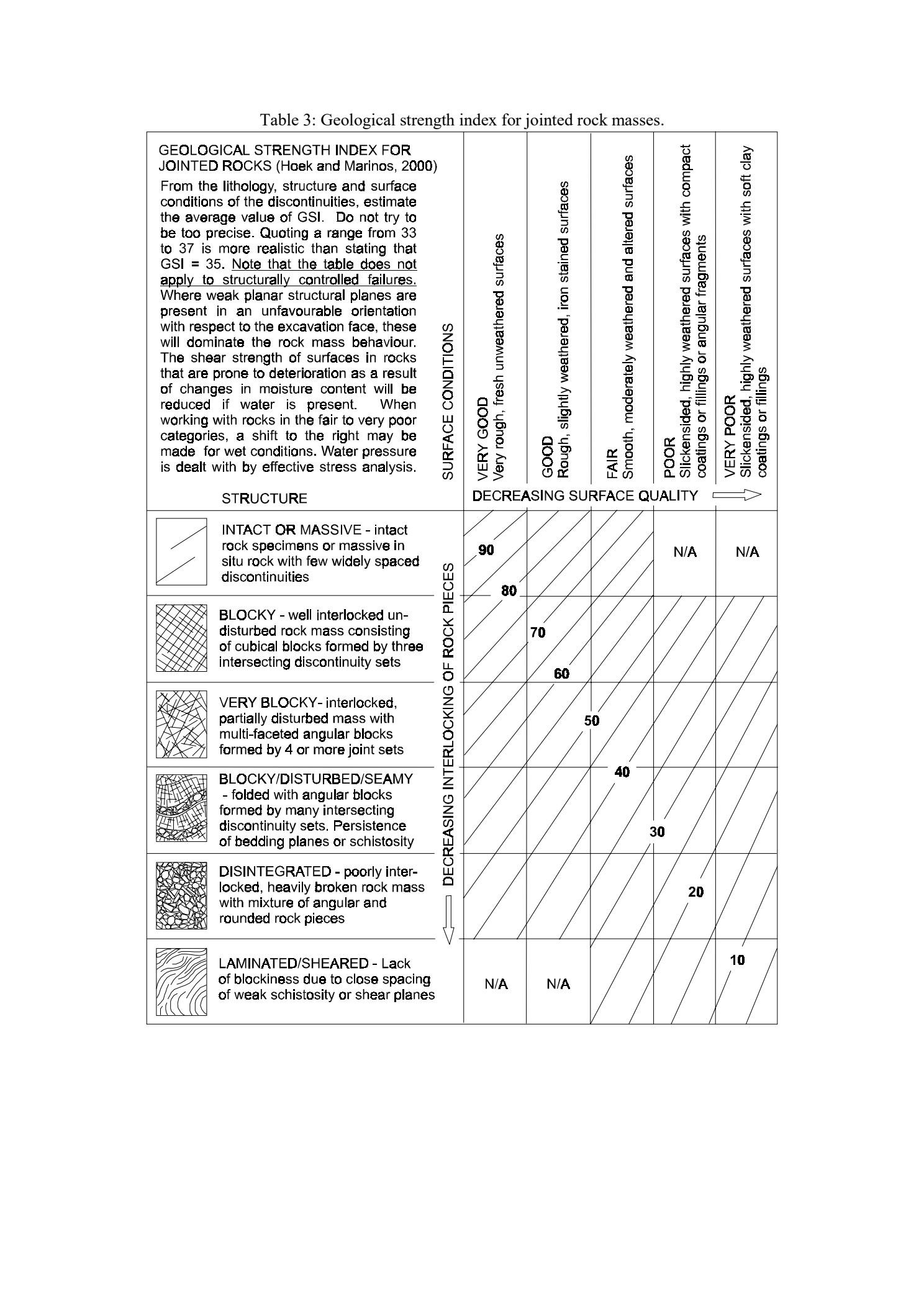
Source: Marinos & Hoek (2000), GSI: A Geologically Friendly Tool for Rock Mass Strength Estimation, Table 3, page 4. This chart does not apply to structurally controlled failures.
Hardness field reference (R0–R6)
R0–R6 describes intact rock strength from field observations, rather than Mohs mineral hardness. Select the observed grade; the reference does not assign an exact UCS.
| Grade | Field response | UCS (MPa) |
|---|---|---|
| R0 | Thumbnail makes an indentation. | 0.25–1 |
| R1 | Peels with a pocket knife; crumbles under firm hammer-point blows. | 1–5 |
| R2 | Difficult knife peeling; firm hammer-point blow leaves a shallow indentation. | 5–25 |
| R3 | Cannot be scraped or peeled with a knife; one geological-hammer blow fractures the specimen. | 25–50 |
| R4 | More than one geological-hammer blow needed to fracture. | 50–100 |
| R5 | Many geological-hammer blows needed to fracture. | 100–250 |
| R6 | Geological hammer only chips the specimen. | >250 |
View original hardness / UCS chart
Swipe sideways to read the full chart. Available offline.
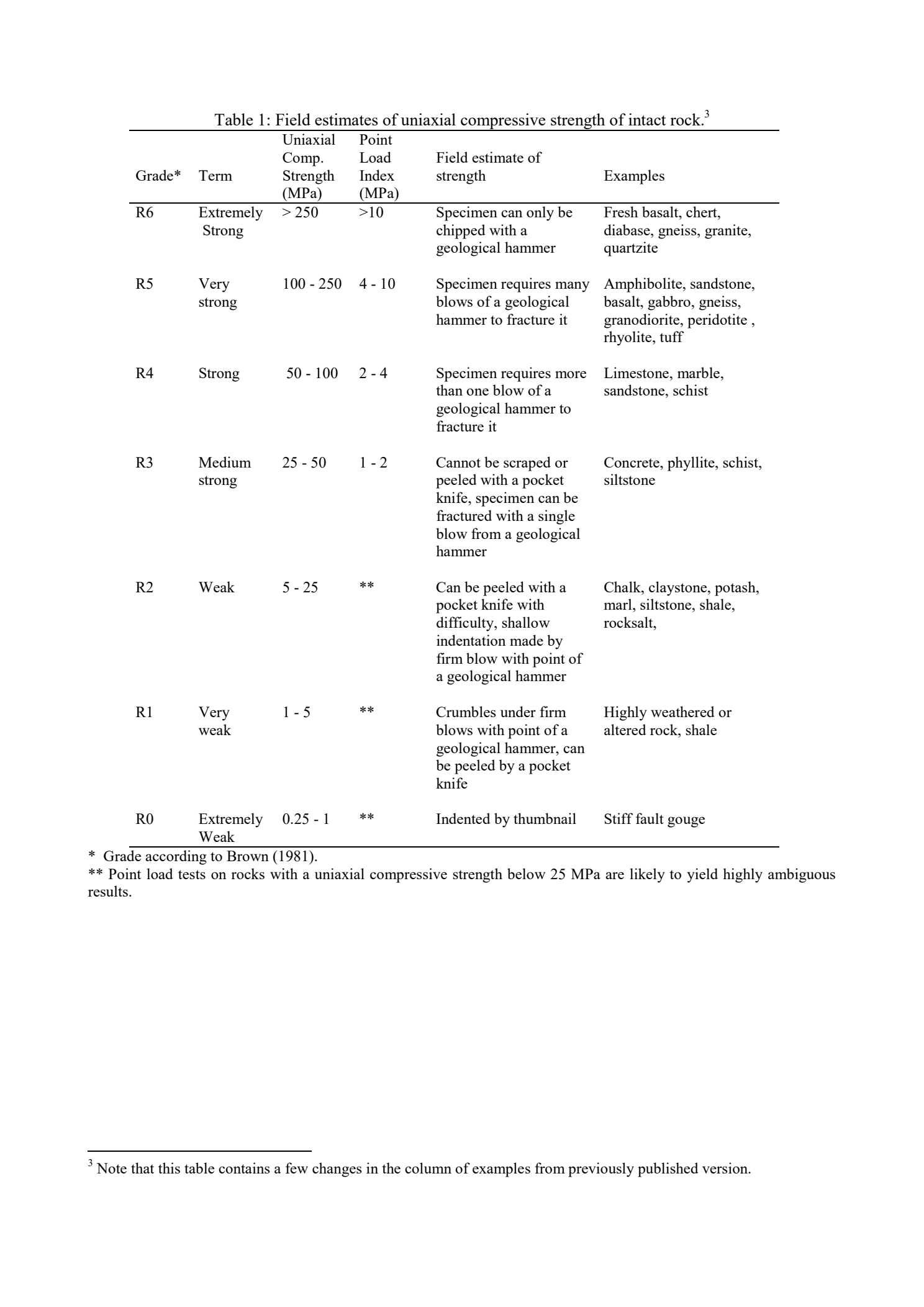
Source: Marinos & Hoek (2000), Table 1, field estimates of intact-rock UCS. Pressure is in MPa; field lengths remain in feet.
RMR 1989: choose a description for each rating. Strength descriptions follow Marinos & Hoek (2000), Table 1; the remaining ratings follow Bieniawski (1989), as reproduced in Hoek's Rock Mass Classification, Table 4. GSI and RMR are different systems. Lengths below are in feet; UCS is pressure, expressed in MPa.
Measured RQD and spacing automatically set their ratings. Observed hardness supplies the field-estimated strength rating. Without an exact measurement you can select a category; the app never invents an exact value. A different supported rating requires a documented override. All five base ratings are required; orientation is optional and must be assessed relative to the intended excavation.
Spacing boundaries are rounded conversions to feet. At a shared boundary, choose the lower rating. Overall condition categories include aperture, weathering, continuity and infill together; do not rate surface roughness alone. Orientation choices identify slopes, tunnels/mines or foundations; they are not a slope stability calculation.
One attachment manager for photos and sketches. Existing primary photos are retained here. External georeferenced GIS photos do not need to be uploaded. Add captions below.
No outcrop selected
Select an outcrop in the Field tab before collecting structural measurements.
Measurement population
Survey, domain & slope reach
Live stereonet
How to read this plot
Each symbol is a pole perpendicular to a saved plane. Shallow-dipping planes plot near the center; steep planes plot near the rim. Poles point opposite the dip direction. Colors and symbol shapes identify sets. Tap a point or use the measurement selector; the solid ring and curve show the selected pole and plane. Overlapping points can be cycled with Next nearby point. The dashed ring marks the newest reading. The plot updates after saving or deleting a measurement and works offline.
Use clusters and scatter as a visual check; a separate point is not automatically a bad measurement. This view does not calculate failure risk. Projection: lower hemisphere, equal angle (Wulff) by default, matching the kinematics view. The grid is spaced 10°. Choose equal area (Schmidt) for an alternative cluster display; recorded angles are unchanged. Stereonet conventions and references.
Contact orientation
Reference: —
Phone position & earlier readings
Hold the back of the phone flush to the rock. For steep surfaces (70–90°), rotate the phone sideways within the plane so its top points across the face, not straight up. Near vertical, opposite dip directions can represent nearly the same plane; check the strike line. Browser compass heading is magnetic. The app applies the project override or automatic offline WMM2025 correction from location and date. Check the displayed source; automatic correction does not calibrate the phone or remove local magnetic interference.
Phone readings saved before v1.11.6 may have an incorrect dip direction. Corroborate or recollect those measurements; do not rotate all historical readings automatically. New captures record the corrected sensor convention.
Compass / verified measurement
—
New discontinuity
Field names mirror the uploaded “Rock Slope Evaluation: Ground-Level Discontinuity Data Sheet.”
Survey, domain & slope reach
Average uses the active Structure set at this outcrop. Copies orientation, type and north reference as a snapshot; later edits remain independent.
Legacy field-sheet value (not used in calculations)
Legacy JCS(R) values are retained verbatim. They are not treated as compressive strength or used in calculations.
Visible trace length & endpoints
Follow one discontinuity across the exposed face. Record the visible length and what happens at each end; this is separate from the roughness-profile lengths used in Barton–Bandis.
Barton–Bandis joint characterization
Record the roughness profile in the expected shear direction, joint-wall strength, friction basis, and test sources. Lengths are feet; stresses and strengths are psi. JRC and rebound numbers are dimensionless.
Roughness assessment
Record the observed range and choose a supported calculation value; no midpoint is assumed.
Barton–Bandis field reference
JRC: compare the measured profile in the expected shear direction with the Barton–Choubey reference profiles (bands 0–2 through 18–20). Select a supported calculation value from 0–20; the app does not silently choose a midpoint. Profile length matters. Use “Enter exact value” for a decimal estimate or test result.
JCS: joint-wall compressive strength, not a rebound number or automatically the intact-rock UCS. Enter psi from a documented test or suitable correlation. The hammer type, orientation, surface condition and calibration belong in the record.
Friction: select the angle supported by your test or estimate, and identify residual versus basic friction. A dropdown number is not a recommended default. Record the source and assumptions; roughness alone does not determine friction.
Scale and stress: L₀ and Lₙ are lengths in feet. JCS and effective normal stress use psi. Apply scale correction only once. Effective normal stress is total normal stress minus water pressure. Record externally calculated stresses or clearly identify an assumed sensitivity range.
Reference: Discontinuity field characterization and shear-strength methods. Based on Barton (1973, 1976), Barton & Choubey (1977), and Barton & Bandis (1982). Method notes and field charts are available offline; external scientific sources require internet.
Save discontinuity retains all inputs and a recalculated result in the record. Backups, GIS properties and the discontinuity CSV include these fields. Partial observations can be saved without a strength result.
Calculation assumptions and reference
τ = σ′n tan[φ + JRC log₁₀(JCS/σ′n)]. Use residual friction for the Barton–Choubey formulation; basic friction is an explicit alternative for fresh, unweathered surfaces. Use an independently supported JCS value. Hammer readings are summarized only: hammer type, orientation, calibration, moisture and the chosen correlation must be documented before estimating strength.
Optional scale correction: JRCₙ = JRC₀(Lₙ/L₀)^(−0.02 JRC₀); JCSₙ = JCS₀(Lₙ/L₀)^(−0.03 JRC₀). Use compatible reference scales and do not correct already scaled values twice. No strength is calculated for nonpositive effective stress, stress above JCS, or an apparent peak angle above 70°. Infill-dominated surfaces need another model. These outputs are not a factor of safety or a constant friction angle for kinematics.
Discontinuity shear strength methods and referencesNo new observation has been entered. Save an empty record with the inherited defaults?
Field display
Field checks & deletion recovery
End-of-day review
Undo restores records and queues their return to cloud backup. Slope rating has its own Undo assessment deletion button.
Saved on this device
Recover from a device backup
Recovery merges by record ID. Existing data and conflicting versions are retained. Review the file's contents before approving recovery.
Online backup
Field records save locally first. The upload queue alone does not confirm a cloud backup. Use Check cloud data to compare saved records with this device. Saved slope ratings are included in backup and restore as independent records. Unfinished drafts are not synced. Photos attached to outcrop records are included.
Complete the security check to request a sign-in link.
Cloud backup is optional and not yet connected.
Cloud data has not been checked on this visit.
This reads data without uploading, restoring, or changing observations. Results describe the time checked; run it again after edits. A difference may be a newer edit on either device. Keep your downloaded backups.
No project selected
CSV files include project and outcrop identifiers so the tables can be joined later in Excel, GIS, Leapfrog, or a database.
All projects on this device
Current v1 backups and legacy v0.2/v0.3 JSON backups are accepted. Legacy unlinked observations are preserved under an imported “UNASSIGNED” outcrop.
Project packages always merge by record ID and cannot replace unrelated projects.
Manuals & field guidance
Step-by-step field procedures and the methods behind the calculations. Matching editions for app v1.35.1.
Field use guide v44 · PDF · opens in a new tab Theory & calculation manual v46 · PDF · opens in a new tabInternet is needed to open these PDFs. Before fieldwork, save a copy to Files or Downloads and check that it opens offline. On iPhone, use Share → Save to Files. Installing the app does not automatically save the manuals.
Project CSVs, all-device GIS, slope CSVs and advanced JSON imports are available in Desktop → Files & recovery. Full device backup and safe merge recovery remain here.
Delete selected records
Delete individual projects and outcrops from their Field forms, or reviewed selections in Desktop. Their related records are included. Independent slope assessments have their own delete controls. Enrolled deletions remain queued until verified.
Clear this device only
Removes this browser’s field records, photos, slope ratings, drafts, recovery copies, and pending uploads, and signs you out. Cloud records stay intact. Export a full backup first; unsynced observations or pending cloud deletions will be lost. Close other app tabs before clearing.
Delete from this device and cloud
Requires internet, sign-in, and backup enabled for that account. Deletes all saved field records and slope ratings from this device and the account’s active cloud backup, including cloud-only records. Clears local unfinished drafts too. Export a full backup first. Keep the app open and retain the local queue until deletion is verified.
Cloud deletion uses recoverable deletion markers; recovery history may remain. Other devices and previously downloaded files may retain copies. This does not securely purge those copies or delete your account.
No deletion requested.
The data-collection and manual-entry portions of this application are functional offline. Browser-derived strike/dip is experimental. Check readings against known planes and a trusted compass before relying on them in the field.
Slope hazard rating
Standalone calculator based on the supplied USMP rating sheet. It does not read or change projects, outcrops, or measurements. Saved assessments are included in online backup through the Data tab.